When an agreement is due to be invoiced is determined by the 'Next Invoice Date' on the agreement. If you would like to change this you can do so on the agreement page.
Changing an agreements 'Next Invoice Date' will also change the service from and service to dates and automatically update the pro-rata dates.
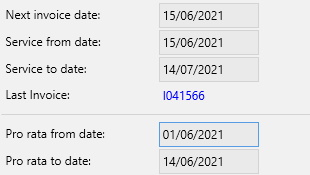
For example, our customer 'Star Coffee Ltd' is currently invoiced on the 1st of the month but would like to change this to the 15th. If we were to simply just change the 'Next Invoice Date' from the 1st to the 15th the customer wouldn't be invoiced for the first 14 days of the month. Therefore in order to accommodate this Service Manager will populate the pro-rata invoice dates to cover these 14 days.
 |
 |
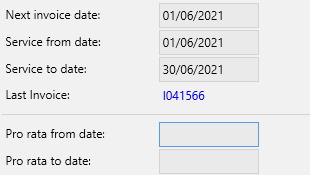
The image on the left shows the customer was due to be invoiced on the 1st of the month for the services in the following month.
The image on the right shows the customer is now invoiced on the 15th and that an additional invoice line will be created for the period cover the 1st to the 14th. This will show as two lines on the invoice.
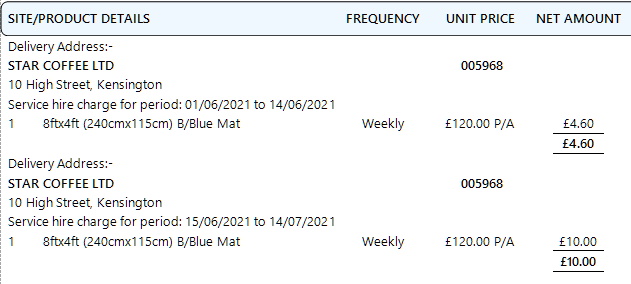
The first lines show the pro-rata dates and the second line is as normal.
The pro-rata dates are automatically cleared after the first invoice is created. If you would like to clear the pro-rata dates without adding them to an invoice simply edit the agreement and clear dates the dates.
To Change the Next Invoice Date
- From the home page , choose the Sales option
- Choose the Agreements tab
- Find and select the correct agreement by using the search window
- Choose Options and Amend Invoice Date
- Select the new Invoice Date and click Ok
- The new 'Next Invoice Date' is displayed along with any pro-rata dates